

Key Points
- The last date for candidates to apply for MAH MBA, MHT CET 2026 is February 12, 2026
- MAH MBA CET attempt 1 from April 6 to 8, 2026
- MHT CET 2026 Attempt 1 to be held from April 11 to 26, 2026
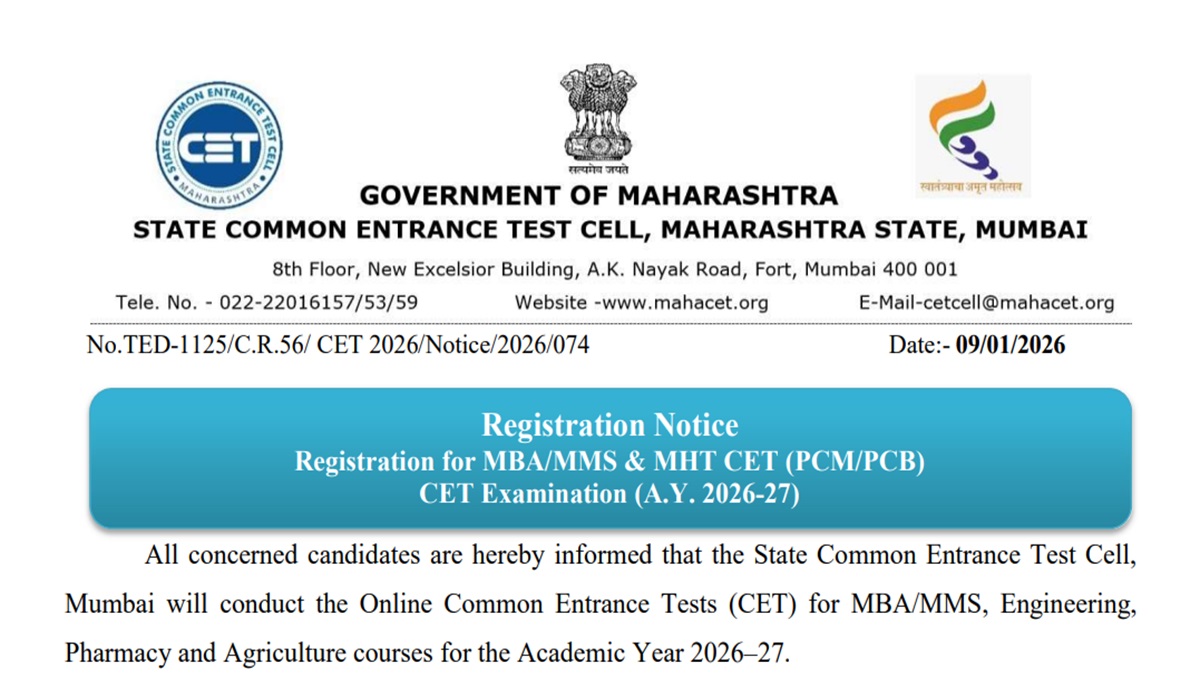
MAH MBA, MHT CET 2026: The link to apply for MAH MBA/ MMS and MHT CET (PCM/ PCB) is available on the official website. To apply for the MBA and MHT CET entrance test, candidates must visit the official website and register through the link on the official website.
According to the schedule released, the last date to apply for both courses is February 12, 2026. This year, the exam is being held in two attempts. The first attempt of the exam will be held in April 2026, while the second attempt will be held in May 2026. Eligible candidates must check the exam schedule and eligibility criteria before registering
MAH MBA, MHT CET registration link is available on the official website cetcell.mahacet.org.in. Candidates can also click on the direct link given here to register.
MAH MBA/ MMS CET 2026 - Click Here
MAH-MHT CET (PCB/PCM) 2026 - Click Here
MAH MBA, MHT CET 2026 Schedule
Candidates can check here the last date to apply, the attempt 1 and attempt 2 exam dates for the MAH MBA and MHT CET 2026
| Sr. No. | Name of CET | Online Registration & Confirmation of Application Form | Tentative CET Examination Date |
|---|---|---|---|
| 1 | MAH–MBA/MMS CET 2026 | Start Date: 10/01/2026 End Date: 12/02/2026 | 1st Attempt 06/04/2026 to 08/04/2026 2nd Attempt 09/05/2026 |
| 2 | MAH–MHT CET (PCM/PCB) CET 2026 | Start Date: 10/01/2026 End Date: 12/02/2026 | 1st Attempt 11/04/2026 to 26/04/2026 2nd Attempt 10/05/2026 to 17/05/2026 |
Steps to Apply for MAH MBA,MHT CET 2026
The link to apply for Maharashtra CET is available on the official website. Follow the steps provided here to apply
Step 1: Visit the official website of Maharashtra CET Cell
Step 2: Click on the 2026-27 academic year link
Step 3: Click on new registration
Step 4: Enter the required details
Step 5: Fill out the application form
Step 6: Upload necessary documents
Step 7: Submit the registration fee
Step 8: Save and click on submit



Comments
All Comments (0)
Join the conversation